Enroute by Orderwerks
Local Delivery Management
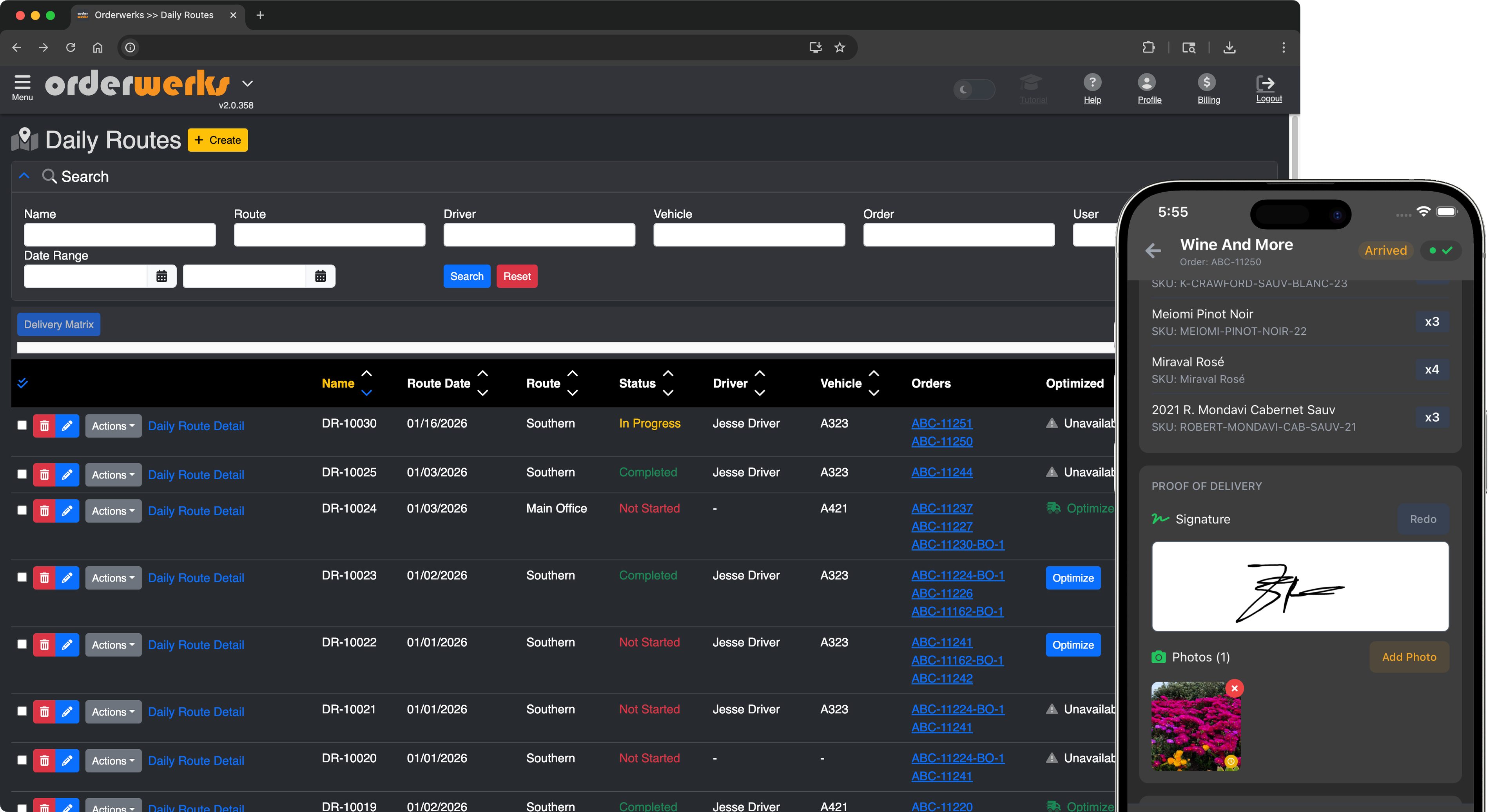
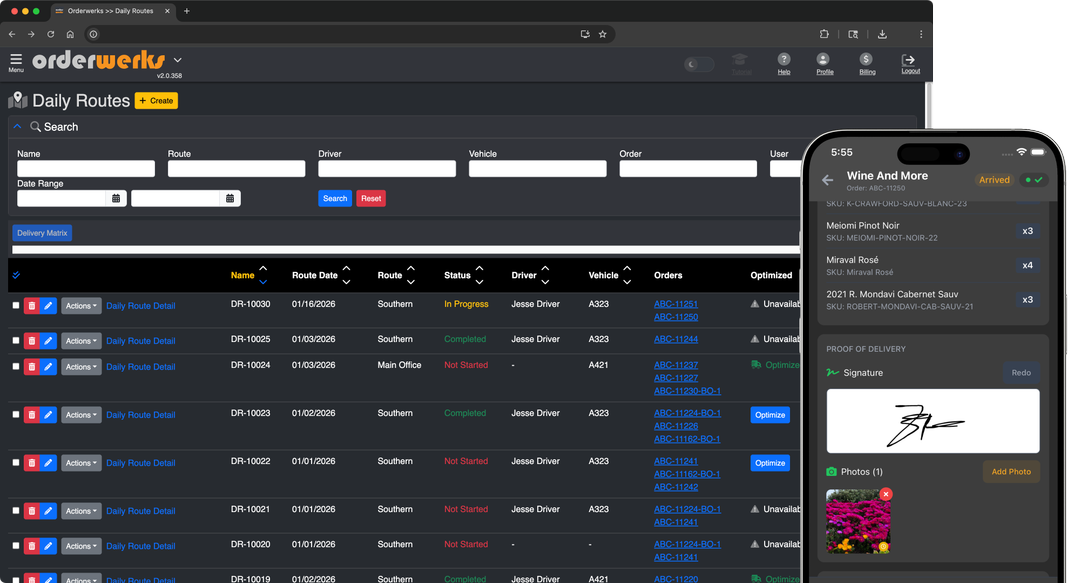
Stop running routes on paper. Plan routes, track drivers, and capture proof of delivery - all in one system.
Built for businesses who run their own delivery trucks. Not last-mile consumer delivery. Part of the Orderwerks platform - connected to your orders and QuickBooks.
Now Available
Run a van sales or DSD operation? Enroute Pro adds truck inventory, selling at the stop, payment capture, and signed invoices to the driver app you already run.
Sound Familiar?
The daily reality of managing delivery routes
Routes are planned on paper or spreadsheets - drivers get a printed sheet each morning
No visibility into where drivers are or which stops are complete
Customers call asking "where's my delivery?" and you can't answer
Proof of delivery is a signature on paper that gets lost or is illegible
No connection between delivery and invoicing - orders delivered but not billed
Driver knowledge lives in drivers' heads - if they quit, you lose the route
Simple Workflow
How Enroute Works
From route planning to proof of delivery in five steps
Plan Routes
Orders ready for delivery flow into route planning. Optimize stop order for efficiency.
Dispatch to Drivers
Assign routes to drivers. They see their stops instantly in the mobile app.
Complete Stops
Drivers navigate to each stop, mark deliveries complete, handle exceptions.
Capture Proof
Collect signature, take photo, add notes. Everything attached to the delivery.
Sync & Invoice
Delivery data syncs to Orderwerks and QuickBooks. Orders marked delivered, ready to invoice.
Everything You Need
Features Built for Route Delivery
Route Planning & Optimization
Plan efficient routes and optimize stop order. If a driver starts late or falls behind, Enroute offers a re-sequenced route with fresh ETAs and flags any stop whose delivery window can't be met.
Driver Mobile App
iOS and Android app built for drivers: large tap targets, one-handed actions, dark mode, English and Spanish, Face ID or fingerprint sign-in.
Live Fleet Tracking
See every delivery vehicle live on a map with its driver, route, next stop, stops completed, and whether it is on time, at risk, behind, or ahead of plan. It runs on the phone the driver already carries, with no tracking hardware to install.
See Fleet TrackingProof of Delivery
Capture signatures, photos, and notes on every delivery, and record skip or failure reasons. Every stop leaves a complete record.
Automatic Arrival and Time on Site
Orderwerks records when each driver arrived at and left every stop, and how long they spent there, from GPS. Drivers tap nothing extra, and the times sit on the route's audit report next to their own check-ins.
Connected to Orders
Delivery stops flow from your Orderwerks orders automatically
QuickBooks Sync
Connect deliveries to invoicing in QuickBooks Desktop or Online
Van Sales (Enroute Pro)
Confirm the truck load, sell from live truck stock, take payment, and hand over a signed invoice at the stop. Same app, enabled per account.
Fleet Tracking
Live driver tracking with no hardware to install
Fleet Tracking shows dispatchers every delivery vehicle live on a map, replays any route, and raises an alert when a driver is off route, stuck, or out of contact. It uses the Enroute app on the phone the driver already carries, so there are no telematics boxes to buy or install.
Live map
Every vehicle on today's routes on one map, updating as drivers move. Each vehicle shows its driver, route, next stop, stops completed, and whether it is on time, at risk, behind, or ahead of plan. Search by vehicle, driver, or route, follow one vehicle to keep it centered, and turn on a live traffic layer. You also see the driver's phone battery level and how long ago the last position arrived.
Planned route vs. what actually happened
The planned route is drawn along real streets, with the track the driver actually drove on top of it. Color the driven track by schedule or by speed. Every route shows distance driven, time moving, time stopped, and top speed, plus planned vs. driven mileage, which also appears on the route audit report.
Route history and replay
Pick any past day and see the routes that ran. Replay a route from start to finish with a slider and adjustable speed. GPS history is kept for 180 days.
Automatic arrival and departure at every stop
Orderwerks works out when the driver arrived at and left each stop from GPS, and how long they spent there, without the driver tapping anything. The times are recorded on the route's audit report alongside the driver's own check-ins. The arrival radius, or geofence, can be set for the whole account, for a specific customer, or for a single stop.
Alerts when a route goes wrong
Fleet Tracking flags a vehicle that is off route, idle away from any stop or the depot, or no longer sending its position while moving, and any stop reached later than planned. Alerts show on the Fleet Tracking page, on the vehicle, and in the route's timeline, and each one can be tuned or switched off for your account.
Nothing extra for drivers
Tracking starts when the driver starts a route and stops when the route is completed or they sign out. It keeps working with the phone locked, the app closed, or after a restart mid-route. It records through dead zones and uploads when signal returns, and it pauses GPS while the vehicle is parked to save battery.
Only during work
Location is collected only while one of the driver's routes is in progress. It is not 24/7 vehicle or employee tracking. Drivers see a clear disclosure and must agree before tracking starts, and they can check tracking status in Settings. Location goes only to your own Orderwerks account, for your dispatchers. It is not used for advertising and is not sold or shared with data brokers.
Fleet Tracking is available now, with Enroute on iPhone and Android. GPS Tracking is switched on per account, so ask us to enable it for yours.
Built for Distributors
Who Uses Enroute
Beverage Distributors
Beer, wine, spirits, soft drinks - route delivery to bars, restaurants, and retailers
Food Service Distributors
Restaurant supply, produce, meat - daily routes to commercial kitchens
Building Materials
Lumber, roofing, supplies - delivery to job sites and contractors
Wholesale Distribution
Any distributor running their own trucks to local customers
Why Enroute
The Difference
Paper Routes & Spreadsheets
- Print route sheets every morning
- No idea where drivers are during the day
- Paper signatures get lost or damaged
- Manual data entry from delivery to invoice
- Route changes require reprinting and phone calls
Enroute by Orderwerks
- Routes appear in driver app automatically
- Every vehicle live on a map, with on-time status and alerts
- Digital signatures and photos on every delivery
- Automatic sync to orders and QuickBooks
- Update routes instantly - changes sync to drivers
Not Like Consumer Delivery Apps
Apps like Routific, Circuit, and OnFleet are built for last-mile consumer delivery - think DoorDash drivers or Amazon packages. Enroute is different. It's built for B2B route delivery: the driver who runs the same route every Tuesday, delivering to the same restaurants, stores, and job sites. Your customers are businesses with accounts and invoices, not one-time consumers.
Connects to Your Systems
Integrations
Orderwerks Orders
Enroute is built into Orderwerks. Orders ready for delivery flow directly to dispatch. Proof of delivery attaches to the order. Everything stays connected.
QuickBooks
Sync deliveries with QuickBooks Desktop or Online. Completed deliveries update order status and attach proof of delivery to invoices. No double entry.
One connected system. Orders, fulfillment, delivery, and invoicing - all in one platform. No juggling separate apps or manual data transfer.
Simple Pricing
$150/month + $25/driver
Enroute Pro (van sales): $150/month + $50/driver
No per-delivery fees. No hidden charges. No long-term contracts.
Trusted by Growing B2B Companies

4.8+ average rating across review platforms
See It In Action
Book a Demo
See how Enroute can streamline your delivery operations. We'll show you the dispatch dashboard, driver app, and proof of delivery workflow.
Questions?
Frequently Asked Questions
No. Enroute works on any iPhone or Android phone. Drivers download the app, log in with their credentials, and they're ready to go. No special hardware, scanners, or rugged devices required.
Yes. Drivers can view their route, mark deliveries complete, and capture signatures and photos without cell service. On Enroute Pro they can also build orders and take payment offline. Data syncs automatically when they're back online, with no duplicates.
Enroute is built into Orderwerks, so deliveries sync automatically with your orders. Orders ready for delivery appear in the dispatch queue. When a driver marks a stop complete, the order status updates instantly. Proof of delivery attaches to the order record.
Yes. Enroute is part of the Orderwerks platform. It connects directly to your orders, customers, and QuickBooks integration. This tight integration is what makes Enroute powerful - your delivery workflow is connected to everything else.
Yes, your team can. Dispatchers and customer service see every vehicle live on the Fleet Tracking map, with its next stop, stops completed, and whether it is running on time, so they can answer "where's my delivery?" without calling the driver. Fleet Tracking is for your staff. Drivers and customer logins do not see it.
Yes. Fleet Tracking shows every vehicle on today's routes live on a map, updating as drivers move. Each vehicle shows its driver, route, next stop, stops completed, and whether it is on time, at risk, behind, or ahead of plan.
No. Fleet Tracking runs on the phone the driver already carries, in the Enroute app they already use for deliveries. There are no telematics boxes, no installation, and no per-vehicle device.
No. Location is collected only while one of the driver's routes is in progress, and it stops when the route is completed or the driver signs out. Drivers see a clear disclosure and must agree before tracking starts. Location goes only to your own Orderwerks account and is not used for advertising or sold to data brokers.
Yes. Enroute keeps recording through dead zones and uploads the track when signal returns, for up to 3 days. It also keeps working with the phone locked, the app closed, or after the phone restarts mid-route. While a driver is out of range, the map shows how long ago the last position arrived.
Each stop has a geofence, a circle around the stop's address that counts as arrived. Orderwerks records arrival, departure, and time spent at the stop from GPS, without the driver tapping anything. The radius can be set from 25 to 5,000 meters, with a default of 150 meters, for the whole account, a specific customer, or a single stop.
No. Fleet Tracking is delivery visibility, not vehicle telematics. It shows where each vehicle is on its route, what happened at every stop, and planned vs. driven mileage. It does not provide engine diagnostics, fuel data, dashcams, harsh-braking detection, or driver scoring, and it does not track vehicles outside an active route. GPS distance typically reads a few percent short of an odometer, so use it to compare routes rather than for tax or billing mileage.
Enroute is $150/month base plus $25 per driver. Enroute Pro, which adds van sales, is the same $150/month base plus $50 per driver. No per-delivery fees, no hidden charges, no long-term contracts.
Enroute Pro is the van sales tier of Enroute for distributors who sell off the truck. Drivers confirm their load each morning, sell from live truck stock with customer-specific pricing, take cash, check, or net terms, hand over a signed invoice, and reconcile stock and cash at end of day. Orders and payments push to Orderwerks and QuickBooks. It's the same app your drivers already use, enabled per account by your administrator.
Learn More
Related Resources
Order Management
Manage orders from entry to fulfillment. Connect your order flow to delivery for a complete solution.
Learn more
Fulfillment
Pick, pack, and ship orders with automated workflows. The step before delivery for distributors.
Learn more
Mobile Apps
Learn about our mobile apps for sales reps, warehouse staff, and drivers.
Learn more
Download the Enroute App
Your drivers can start capturing proof of delivery and optimizing routes today.
Available for iOS and Android. Drivers view their routes, navigate to stops, capture signatures and photos, and sync delivery status in real time, even with limited connectivity. Enroute Pro accounts also confirm loads, sell from the truck, take payment, and invoice at the stop.

Enroute vs. Enroute Pro
Base Enroute handles pre-sell delivery. Enroute Pro adds van sales for distributors who sell off the truck. Both run in the same app; Pro is enabled per account.
| Feature | Enroute (Base) | Enroute Pro |
|---|---|---|
| Pre-built daily routes | ||
| Route re-sequencing with live ETAs | ||
| Status updates and proof of delivery | ||
| Signature and photo capture | ||
| Offline-first sync | ||
| Native iOS and Android, English and Spanish | ||
| Daily load sheet with barcode counts | ||
| Sell from truck with live inventory | ||
| Customer-specific pricing at the stop | ||
| Par-level suggested orders and shelf counts | ||
| Returns and credits on the same ticket | ||
| Payment capture (cash, check, net terms) | ||
| Signed PDF invoice: print, share, or email | ||
| Cold calls and on-the-fly route changes | ||
| End-of-day stock and cash reconciliation | ||
| Orders and payments push to QuickBooks | (orders) | (orders and payments) |
| Pricing | $150/mo + $25/driver/mo | $150/mo + $50/driver/mo |
Ready to optimize your delivery routes?
Stop running routes on paper. See how Enroute can bring visibility, efficiency, and proof of delivery to your distribution business.
