For Manufacturers
Order Entry Software for Manufacturers

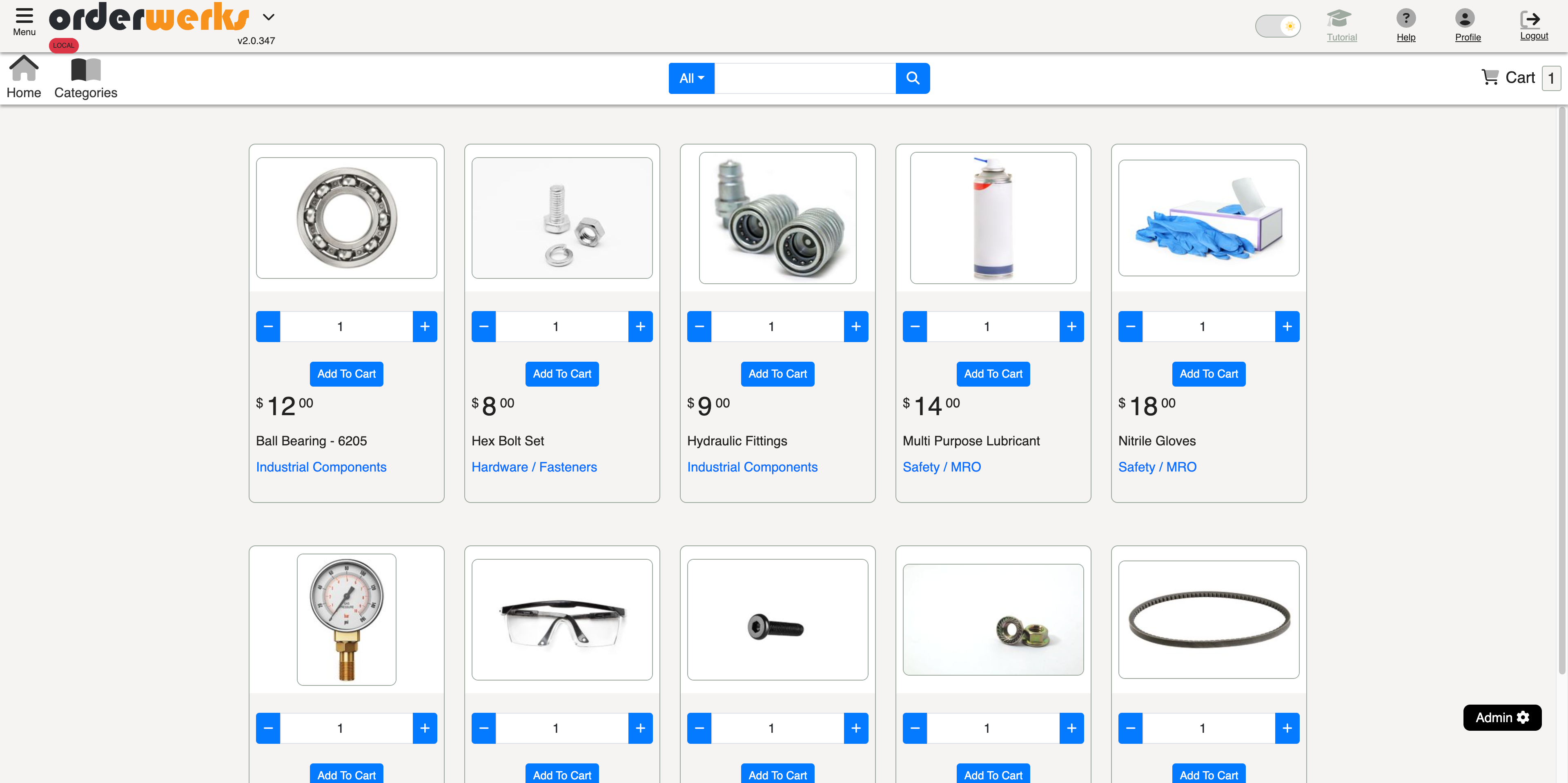
Orderwerks® is order entry software built for manufacturers who sell through distributors, dealers, or direct to other businesses. Manage orders, track end customers, and ship in batches without the ERP overhead.
You make products. Orderwerks handles the order entry, fulfillment tracking, and invoicing so your team can process and track orders without juggling spreadsheets, email threads, or a full ERP rollout.
Sound Familiar?
Most Manufacturing Software Is Massive Overkill
- Full ERP systems with modules you'll never touch
- Six-figure implementations. Months of configuration. That's not what you need when you just want to manage orders.
- No visibility into end customers
- Your distributors place orders, but you have no idea where products actually go. When end customers reorder, you don't see the pattern.
- Batch shipments are a nightmare
- Large projects don't ship all at once. You produce and ship over time, but tracking what's been shipped vs. ordered lives in spreadsheets.
- Double data entry into QuickBooks
- Orders come in one system, then get re-keyed into QuickBooks. Your accountant shouldn't need to learn a new system.
Built for How Manufacturers Sell
Order Management That Works the Way You Operate
- Sell Through Distributors, Track End Customers
Your distributors place the orders, but you need to know where products actually go. Associate each order with the end customer, so when your distributor's customer in Georgia reorders, you have a complete history even though the order came through your distributor.
- Ship in Batches
Large projects don't ship all at once. You produce and ship over time. Orderwerks tracks what's been shipped against what's been ordered, so you always know what's outstanding.
- Generate Packing Lists That Make Sense
Create packing lists showing exactly what's in each shipment: quantities shipped, items remaining, your branding. Customize what fields appear. Print or email directly to your buyer or their customer.
- Keep QuickBooks as Your Accounting System
Orders flow through Orderwerks, invoices push to QuickBooks. Your accountant doesn't need to learn anything new. Inventory stays accurate. No double entry.
- Recurring Order Visibility
For products that wear out and get reordered, see the pattern. Know which end customers are likely to reorder and when. Stop being surprised by demand.
- Distributor Portal
Give your distributors a branded portal to place their own orders. They see their pricing, their order history, their products. You review and approve before anything ships.
Manufacturing Workflows
Order Entry Software Built for Manufacturing Workflows
Manufacturing order entry is rarely straightforward. Orders ship in batches, not all at once. Inventory lives across multiple locations. Products include serialized items and kitted assemblies. Orderwerks handles all of this while connecting to the inventory and warehouse systems manufacturers already use.
Multi-Warehouse Inventory Visibility
Track inventory across multiple warehouse locations from a single dashboard. Customers and sales reps see available stock per location before placing an order, which reduces backorder surprises and misallocated shipments. Create warehouse-specific catalogs so each location shows only what it actually stocks. Fulfillment routes to the correct warehouse automatically based on order configuration.
Backorder Management for Manufacturing
When an order comes in for more than what is on hand, Orderwerks tracks the shortfall as a backorder rather than rejecting the order or losing the line item. Set backorder limits per product to control how far ahead customers can order. When new inventory arrives, held stock allocates automatically to outstanding backorders in the order they were received. For manufacturers with long production lead times, this visibility is the difference between organized fulfillment and guesswork.
Partial Shipment and Batch Fulfillment
Ship what is ready now and fulfill the rest later. Orderwerks tracks shipped quantities against each line item so you always know what has gone out, what is still outstanding, and what needs a packing list. Each shipment generates its own packing list. Order status updates automatically from open to partially shipped to fully shipped, giving your team and your customers clear visibility into fulfillment progress.
Drop Ship Support
Not every order ships from your warehouse. Flag orders as drop ship when a third party fulfills them directly to your customer. Inventory checks are bypassed for drop ship orders so your available stock stays accurate for warehouse-fulfilled orders. Manufacturers who split fulfillment between their own facilities and third-party suppliers can manage both workflows in one system.
Kit Builders
Sell products that are assembled from individual components. Orderwerks supports simple kits for straightforward bundles and advanced Kit Builders for more complex assemblies. When a customer orders a kit, the component items are tracked together as a single sellable unit. This is common for manufacturers who package multiple parts into a finished product or starter kit for their customers.
Serial Number Tracking
Track serial numbers at the item level during receiving. Import serial numbers in bulk via CSV or enter them individually. Define serial format patterns to enforce consistency across your catalog. For manufacturers of serialized goods such as equipment, electronics, or precision components, serial tracking ties each unit back to the order it shipped on.
Fishbowl Inventory Integration
Manufacturers who use Fishbowl for warehouse and inventory management can connect it directly to Orderwerks. The integration provides bidirectional sync for products, customers, and inventory levels. Orders placed through your portal or by sales reps push to Fishbowl as sales orders with full line-item detail. Shipments pull from Fishbowl automatically, updating order status and sending tracking notifications to your customers.
Full Feature Set
Features That Matter for Manufacturing
End Customer Tracking
Associate orders with the actual end customer, not just the distributor
Partial Shipments
Ship what you have, track what's left on each order
Packing Lists
Generate branded packing lists showing quantities shipped and remaining
QuickBooks Sync
Orders become invoices automatically, Online or Desktop
Recurring Order Visibility
See reorder patterns and anticipate demand
Customer-Specific Pricing
Volume tiers, contract rates, product-specific discounts
Multiple Product Lines
Run different brands from the same system
Distributor Portal
Give distributors self-service ordering with their pricing
Mobile App
Sales reps can enter orders from any device
Why Us
Why Manufacturers Choose Orderwerks
- US-Based Company
- Orderwerks is American-owned and operated. Our team is here, in your time zone, and understands manufacturing businesses.
- Built for Growth, Not Complexity
- We've helped businesses scale from $500K to $7M+ in revenue without adding headcount to process orders. You don't need a quarter-million-dollar ERP to grow.
- Not an ERP, Not Overkill
- We handle the flow from order to shipment to invoice. We don't try to run your production floor, manage your HR, or replace systems that already work.
- QuickBooks Stays Your System of Record
- We're not trying to replace QuickBooks. We extend it with a customer-facing portal and operational tools while keeping your accounting exactly where it is.
The Difference
Order Management vs. Full ERP
You don't need enterprise software to get enterprise results. Orderwerks gives you what you need without the complexity.
Orderwerks
- Affordable monthly pricing (starts at $100/month)
- Works with QuickBooks (keeps your existing accounting)
- End customer tracking (see where products actually go)
- Partial shipments (track batches against orders)
- Live in 2-4 weeks (not months of implementation)
Full ERP Systems
- Six-figure implementation (massive upfront investment)
- Replaces everything (forced migration from QuickBooks)
- Modules you'll never use (HR, production floor, supply chain)
- Months of configuration (before you see any value)
- Multi-year contracts (locked in for years)
What Our Customers Say
I've looked over all these different CRMs and all these different production software platforms, and they're overkill. That's not what I need. You've come in and tweaked your software to allow it to work for the type of manufacturer we are. And I really appreciate that.
Trusted by Manufacturers Across the Country
From automotive suppliers to industrial equipment makers, manufacturers use Orderwerks to manage B2B orders without the overhead of full ERP systems.
Trusted by Growing B2B Companies



4.8+ average rating across review platforms
Simple Process
How It Works
- 1
Orders come in
From your distributor portal, from your sales team's mobile app, or entered directly by your staff.
- 2
You review and confirm
Check inventory, verify pricing, make adjustments if needed.
- 3
Production happens
Outside of Orderwerks, however you currently do it.
- 4
You ship in batches
Mark quantities shipped, generate packing lists, track what's left.
- 5
Invoice when ready
Push to QuickBooks as an invoice, automatically or on your schedule.
See It In Action
Schedule a 30-minute demo. We'll show you how order management, batch shipments, and end customer tracking work, and answer your questions about your specific setup.
- See how distributors place orders through your branded portal
- Learn how partial shipments and packing lists work
- Understand end customer tracking and reporting
- See the QuickBooks integration in action
Or call us directly: 1-888-893-7574
Learn More
Related Resources
B2B eCommerce Portal
Learn how your distributors can browse products, check pricing, and place orders 24/7 through your branded portal.
FeatureQuickBooks Integration
See how orders sync automatically with QuickBooks Desktop and Online, eliminating double data entry.
FeatureFulfillment
Discover how to manage partial shipments, generate packing lists, and track what's been shipped vs. what's outstanding.
BlogOrder Management for Manufacturers - No ERP Required
Order Management for Manufacturers: You Don't Need a Full ERP
FAQ
Frequently Asked Questions
Yes. The "clients" feature lets you associate each order with the end customer even when the order comes through a distributor. You can run reports by end customer, see order history, and identify recurring revenue patterns.
Yes. Enter the quantities shipped for each line item. The system tracks what's been fulfilled and what's outstanding. Generate packing lists for each shipment.
Not required. You can enter orders on their behalf. But giving distributors portal access reduces your order entry workload and gives them visibility into their order history and status.
Orderwerks supports multiple catalogs and can accommodate different branding on documents. Talk to us about your specific setup.
Most manufacturers are live within 2-4 weeks. We import your products from QuickBooks, configure your customer accounts and pricing, and train your team.
Pricing starts at $100/month. No per-transaction fees. Contact us for details based on your specific needs.
Yes. Orderwerks connects directly to Fishbowl for bidirectional sync of products, customers, and inventory levels. Orders placed through your portal or by sales reps push to Fishbowl as sales orders. Shipments pull from Fishbowl automatically with tracking notifications sent to your customers.
Yes. When an order exceeds available inventory, Orderwerks tracks the shortfall as a backorder. You can set backorder limits per product and control allocation. When new inventory arrives, held stock allocates to outstanding backorders automatically in the order they were received.
Ready to Simplify Your Manufacturing Order Management?
Stop drowning in spreadsheets and manual processes. See how Orderwerks gives you the order management you need without the ERP overhead.
US-based company · Works with QuickBooks · Starting at $100/month
